Set up your profile
A complete profile builds trust with buyers and sellers. It takes two minutes.
Add a profile photo
Listings from accounts with photos get significantly more interest. Use a clear, friendly photo.
Add your phone number
Gives you a ✓ Verified badge — showing buyers you're a real person. Your number is never shown to other users.
Add your Revolut tag
When a buyer accepts your offer, they see a direct Revolut link with the exact total pre-filled. You get paid instantly.
Get paid instantly with Revolut
Add your @tag in Profile settings. When an offer is agreed, buyers pay you in one tap — correct amount pre-filled including delivery.
How to find your tag: Open Revolut → tap your profile photo (top left) → your tag is shown as @yourname under your name. Don't have Revolut? It's free and takes 2 minutes to set up.
List your item
Listing is free and takes about 60 seconds. Good photos and honest descriptions sell faster.
Add clear photos
Take photos in good light from multiple angles. Show any flaws honestly — it builds trust and avoids disputes. You can reorder and rotate photos after uploading. iPhone photos (HEIC) are converted automatically.
Set your delivery options
Choose which delivery methods you're happy to offer. Buyers will only be able to select from these when making an offer — so only tick what you can actually do.
Set a fair price
Check what similar items sell for. Buyers can make offers, so you don't need to start at your lowest price.
🚫 What you can't sell
Almost anything legal is welcome on Sellinn. A short list isn't — mainly so buyers can trust that what they see is real and safe.
- Illegal items, drugs, weapons, or controlled substances
- Counterfeit, replica, or fake branded goods of any kind
- Adult content or services
- Live animals, including rehoming — pet supplies, food and accessories are welcome
- Items subject to a recall or safety notice
- Anything else that breaks Irish or EU law
Listings that break these rules are removed on sight, without warning — and repeat offenders are banned. See the full terms for details, or use the Report button on any listing that looks off.
✨ Import a listing from another site
Already selling on Adverts.ie, Vinted, eBay, or anywhere else? Paste the link and Sellinn will auto-fill your listing — title, description, price, category, condition and photos.
- ✅ eBay, Amazon, Vinted — title, description, price, photos
- ✅ Depop — title, price, photos
- ⚠️ Adverts.ie, DoneDeal — partial import only (these sites block automated access)
- ✅ Most retail sites — full product details imported
Making and receiving offers
Sellinn has a built-in offer system so buyers and sellers can agree on a fair price — with delivery handled in the same step.
Buyer makes an offer
The buyer enters their offer price and selects a delivery method from the options you set. They also provide their delivery address if posting. You see the full breakdown — offer, delivery, and total.
Seller responds
Accept, Counter with a different price, or Decline. You'll get an email notification for every offer. When you accept, the buyer's delivery address is automatically shared in the chat.
Offer accepted → Revolut payment link appears
The buyer sees a Revolut link with the exact total pre-filled (offer + delivery). One tap and you're paid. If you haven't added your Revolut tag yet, add it in Profile settings.
Completing the sale
Once an offer is agreed, the chat shows a transaction status bar that guides both sides through to completion.
How payments work
Payments on Sellinn are made directly between buyers and sellers. We don't handle or hold money.
📱 Install Sellinn as an app
Sellinn works exactly like any app — except you install it directly from the site in seconds. Once installed, it lives on your home screen with the Sellinn icon, just like Instagram or WhatsApp.
- Home screen icon — open Sellinn in one tap
- Full screen — no browser bars, more room for listings
- Push notifications — never miss an offer or message
- Free forever — no download from a store
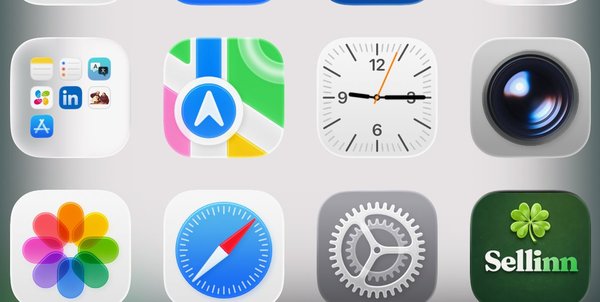
Real screenshot — Sellinn lives on your home screen like any app
📱 On iPhone or iPad
In Safari, tap the Share button (the square with an up-arrow at the bottom of the screen), scroll down and choose Add to Home Screen. The Sellinn icon will appear on your home screen — open it from there for the full app experience.
🤖 On Android
In Chrome, tap the menu (⋮) in the top-right and choose Install app. On most devices, Sellinn also offers a one-tap install banner the first time you visit.
💻 On a computer
In Chrome, Edge or Brave, look for the install icon in the address bar (a small monitor with a download arrow). Click it and Sellinn opens as a desktop app — useful for power sellers managing multiple listings.
🔔 Notifications
Sellinn sends instant push notifications when you get a new message, offer, or sale — so you never miss a buyer. Email is still the backup for those. But listing expiry reminders and saved-search matches are push-only, with no email backup — if you want those, installing Sellinn and turning push on isn't optional, it's the only way to get them.
Enable push from your Profile
Open your Profile screen and look for the 🔔 Notifications section. Tap Enable — your browser will ask permission. That's it on desktop and Android.
📱 On iPhone or iPad: install the app first
Apple only allows push notifications for apps installed to your Home Screen. In Safari, tap the Share button → Add to Home Screen. Open Sellinn from the new icon (not Safari), then enable notifications from your Profile. Without this step, iOS will silently block push permission.
🤖 On Android: install for a better experience (optional)
Push works in Chrome straight away — but installing Sellinn as an app gives you a proper icon, full-screen view, and faster startup. Tap the menu (⋮) in Chrome → Install app.
What you'll be notified about
New chat messages, offers received or accepted, items marked sold, price drops on listings you've saved, and a daily nudge for Wordinn (see below). You can disable any time from the same Profile toggle.
🍀 How to play Wordinn
Wordinn is Sellinn's daily Irish word puzzle. Five letters, six guesses, one new word every day at midnight. It's the same word for everyone in Ireland — your job is to figure it out before your friends do.
Find it at sellinn.ie/play or tap the 🍀 in the navigation.
Type any 5-letter word
Use the on-screen keyboard or your physical one. Press Enter to submit your guess.
Read the colours
A Green — right letter, right spot.
B Yellow — right letter, wrong spot. The letter is in the word, just somewhere else.
C Grey — letter not in the word at all. Cross it off.
You have six guesses
Use them wisely. Most players solve it in 3–5. Get it right and you build a streak; miss it and your streak resets.
Come back tomorrow
A fresh word drops at midnight Irish time. Enable push notifications above and we'll send you a nudge each morning so you don't break your streak.
Common questions
🔒 Sellinn will never message you first — on any listing, or anywhere else
We do not send messages asking you to "verify," "confirm" your account, or review your payment setup — we have no reason to and never will. All genuine Sellinn communication happens only between buyers and sellers, inside the app. Payments only ever happen directly through Revolut, when an offer is accepted — never through an outside link. If you receive a message like this, it is not from us. Please don't click any links, and report it to us straight away so we can act on it.
Is Sellinn really free?
Yes — 100% free. No seller fees, no buyer charges, no catch.
♻️ I accidentally marked my item as sold — how do I undo it?
Go to My Listings and tap the Sold tab, then tap ♻️ Re-list on the item. It goes straight back live for 30 days with the same photos and details.
⭐ Where is the Leave a review button?
Open the seller's profile by tapping their name on any listing or in your chat. The ⭐ Leave a review button appears at the top of their reviews section — it only shows if you've had a transaction with them.
📱 How do I install Sellinn on my home screen?
iPhone (Safari): Tap the Share button (↑) at the bottom, then tap "Add to Home Screen". Sellinn appears as an app — no App Store needed.
Android (Chrome): Tap the menu (⋮) top right, then tap "Add to Home Screen" or "Install app".
🔧 Something looks wrong — what do I do?
A quick refresh fixes most issues. On mobile, pull down to refresh. On desktop, press Ctrl+R (Cmd+R on Mac). If it persists, tap the 💬 feedback button and let us know.
🔒 Is my email and phone number visible to others?
No. Your email and phone are never shown to other users — only used to verify your account and send notifications. Other users only see your display name, county, and profile photo.
How do I ship with An Post?
Get a free Advantage Card at your local post office for discounted rates with tracking included. Or use Click & Post to print a label at home.
What if something goes wrong?
Contact us at hello@sellinn.ie and we'll help. You can also report any listing directly from the listing page using the ⚑ Report button.
Can I sell anything?
Almost anything legal — clothes, electronics, GAA gear, trading cards, furniture, books, handmade and craft and more. You can also list services, like plumbing, electrical work, gardening or cleaning — real people offering real help, not just items. See what's not allowed above, or the full terms. Counterfeit items are strictly prohibited.
🏬 Is Sellinn an advertising platform for businesses?
No. Sellinn is peer-to-peer — individuals selling items they own or offering their own services, directly to other people. It's not a place to advertise a business, website, or brand, and listings that exist mainly to promote a company rather than offer something real will be removed on sight, without warning or explanation. Keep doing it and you'll be banned.
🙈 How do I withdraw a listing without selling it?
Go to My Listings and tap Withdraw on the item. It's hidden from the marketplace but not deleted — find it any time under the Withdrawn tab and tap ♻️ Re-list to bring it back. If you have an active chat or pending offer on it, you'll be warned first — withdrawing hides the listing but any ongoing conversation still continues.
🏖️ What does Holiday mode do?
Toggle Holiday on a listing (from My Listings) to hide it from other buyers while you're away, without withdrawing or losing your saves/views. Tap Resume to make it live again any time.
✏️ Can I edit a listing after posting it?
Yes — go to My Listings and tap Edit on any active listing to change the title, price, description, category, location, photos and other details.
🚫 I made an offer by mistake — can I cancel it?
Yes, as the buyer you can tap 🚫 Cancel my offer in the chat — but only before the seller has responded. Once the seller has replied or accepted, it can no longer be cancelled from your side; message them directly instead.
📦 How does postage pricing work when I set up my listing?
Any delivery options you select (An Post, International EU, etc.) are paid by the buyer, on top of the item price — never deducted from what you receive. These options are shown to the buyer when they make an offer, and whichever one they choose gets added to the total automatically, so the Revolut payment always covers both the item and the postage together. We'd recommend ticking as many delivery options as genuinely suit you — the more choice a buyer has, the more likely they are to go ahead with an offer.
🔄 Why did my listing move position on the homepage?
Sellinn's feed rotates every hour, so it's not just newest-listing-wins forever. Everyone browsing during the same hour sees a consistent order, but which listings sit near the top shifts each hour — giving older listings a fair chance to be seen too, not just whatever was posted five minutes ago. Nothing you need to do; it happens automatically and applies to every listing equally.
🗑️ How do I delete my account and all my data?
Go to your profile → scroll to the bottom → Danger zone → Delete my account. After you confirm, this permanently removes your name and details from your profile, listings, messages and reviews, withdraws your active listings, and signs you out. Conversations and reviews stay in place for the other people who were involved, but they'll no longer show your identity. This can't be undone.
🛡️ Staying safe — keep everything on Sellinn
For your own safety, keep all chat, offers and payment inside Sellinn. Be cautious if anyone asks you to move the conversation to WhatsApp, email, or another app, or to pay through an outside link — that's a common tactic to get around the protections built into the platform. Sellinn will never message you asking you to "verify" or "confirm" your account. If a listing or message pushes you off-platform or feels off, don't follow it — report it to us and we'll take a look.
🏪 Can I share all my listings in one link?
Yes — every seller has a shop page showing all their live listings, recently sold items, and reviews in one place. Find your link in your Profile under "Your shop link", tap to copy it, and share it anywhere — social media, group chats, wherever. Handy if you're posting a lot at once and want people to browse everything rather than just one item.
🎁 How do I earn free bumps by referring friends?
Tap the 🎁 icon in the top navigation to get your personal referral link — it goes straight to your shop page, so it's worth sharing with a friend, dropping in your Instagram bio, or posting on your Facebook page. When someone signs up using your link and makes their first sale on Sellinn, you get a free bump added to your account, ready to use on any listing whenever you like. No limit — refer 10 people who go on to sell, get 10 free bumps.
🔍 Can I save a search and get notified of new matches?
Yes — search or filter for what you're after, then go to your Profile and tap "+ Save current search." Turn on 🔔 New listing matches in your Profile's notification toggles and you'll get a push notification whenever a new listing matches — no email involved, so make sure push is enabled if you don't want to miss one.
👥 Can I follow a seller I like?
Yes — on any seller's shop page, tap "+ Follow." They'll show up in your Profile under "Following," so you can jump straight back to their shop and see what they've got listed, any time.
♻️ How do I re-list a sold, expired, or withdrawn item?
Go to My Listings and find the item — tap the ♻️ Re-list button. Choose "Re-list for free" and it goes straight back live for another 30 days with the same photos and details. Works the same whether the item was sold, expired, or you'd previously withdrawn it yourself.
Badges
Badges are earned automatically based on your activity. They appear on your profile and listings so buyers can see at a glance how reliable you are.
New Seller
Awarded when you post your first active listing on Sellinn. A great starting point — shows buyers you're here and ready to sell.
Frequent Lister
Earned when you have 10 or more active listings at the same time. Shows buyers you're an active, committed seller with plenty to offer.
Top Rated
Earned when you have 5 or more reviews with an average rating of 4.5 stars or above. The strongest trust signal on Sellinn — buyers love this one.
Fast Responder
Earned when your average reply time is under 2 hours. Buyers get frustrated waiting — this badge tells them you're on the ball. Keep notifications on to maintain it.
Trusted Seller
Earned after 10 or more completed transactions on Sellinn. Once earned, never lost — a permanent mark of experience and reliability.
Quick Shipper
Earned when you consistently post items within 24 hours of receiving payment, across 3 or more sales. Buyers know their item is on its way fast.